Why Workflow Automation Delivers Real Value
Workflow automation uses software to run repeatable business processes with minimal human handoffs. It strings together steps, connectors, and rules so routine work happens faster and with fewer mistakes. This article breaks down the tangible gains automation brings — efficiency, accuracy, and faster decisions — while keeping implementation and ROI front of mind. You’ll get clear explanations of the core benefits, cost, and ROI considerations, the tools worth evaluating, real-world examples, a practical rollout checklist, and a look at where workflow management is headed. We balance strategy with pragmatic, hands-on guidance so decision-makers can spot high-impact pilots that deliver quick time-to-value.
What Are the Key Advantages of Business Process Automation?
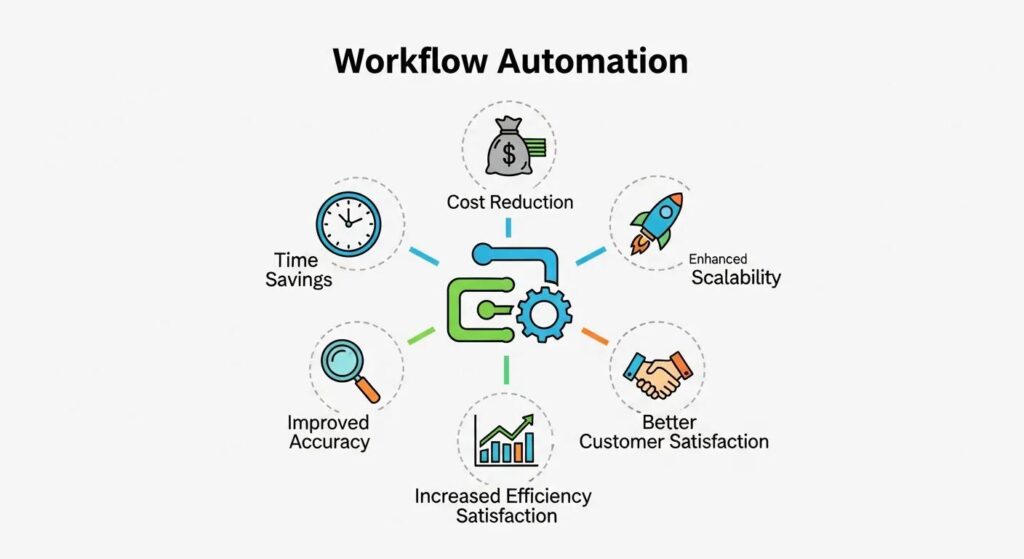
Business process automation consistently improves outcomes by taking repeatable, low-value work off people’s plates, enforcing standard workflows, and automatically capturing data to cut errors. The mechanics are simple: triggers replace manual handoffs, connectors sync systems, and rules enforce compliance. Below is a focused list of the main benefits with short explanations designed to be scannable and valuable for search snippets.
Workflow automation benefits include:
- Operational efficiency: Automating routine steps shortens cycle times and frees teams to focus on higher-value work.
- Error reduction and compliance: Standardized rules and audit logs reduce rework and lower regulatory risk.
- Scalability and standardization: Workflows grow with demand without a matching rise in headcount.
- Better employee experience: Removing repetitive tasks increases engagement and lets staff focus on strategic work.
- Faster decision-making: Automated data capture and dashboards surface timely insights for data-driven choices.
These outcomes tie directly to process-improvement goals and form the backbone of measurable automation ROI. Next, we look more closely at how these gains appear at the transaction level.
Each benefit maps to measurable improvements in time and quality.
How Does Workflow Automation Improve Operational Efficiency?
Automation reduces manual handoffs, speeds approvals, and coordinates parallel tasks, enabling processes to move without human delay. For example, an automated invoice approval flow can route documents, validate line items against purchase orders, and trigger payments — replacing long email threads and multiple touchpoints. Benchmarks commonly show workflows finish 20–40% faster after automation and suffer fewer entry errors. Orchestration tools also highlight bottlenecks via dashboards, whichhelps teams target slow steps for improvement. By turning manual waits into predictable throughput, automation supports scale and lets staff shift to higher-value activities.
How Can Automation Reduce Costs and Enhance ROI?
Automation lowers costs by cutting repetitive labor, reducing error remediation, and increasing throughput, unlocking additional revenue. The savings come from labor reallocation (measured in FTEs), fewer compliance incidents, and faster cycle times that improve cash flow — all contributors to automation ROI. Below are practical examples and a simple model you can use to estimate payback and test project viability.
To illustrate ROI, consider these short examples and a mini-model:
- Labor savings example: Automating claims intake can eliminate roughly 2 FTEs of manual work per 1,000 claims per month — annual labor savings can exceed six figures depending on wages.
- Error reduction example: Cutting rework by 40% in order processing reduces remediation costs and material waste.
- Throughput increase example: Automating lead routing speeds sales follow-up, improving conversion, and incremental revenue per lead.
Feed these figures into a basic ROI formula: (Labor savings + Error remediation savings + Incremental revenue) ÷ Implementation cost = Payback multiple and payback period. Estimating FTE equivalents and conservative adoption curves produces defensible forecasts for stakeholders. After quantifying savings, break down which cost buckets the automation will affect to build a phased payback plan.
What Are the Cost Reduction Benefits of Digital Process Automation?
Digital process automation reduces direct costs such as repetitive labor, rework due to data errors, and penalties from compliance lapses. Labor reclaimed by software can be measured as FTE equivalents and redeployed to revenue-generating or strategic activities. Error reduction cuts correction workflows and customer remediation costs — especially impactful in high-volume environments. Recent deployments have often reported 20–30% efficiency gains in targeted processes, translating into faster cycle times and lower operating expenses. Accurate savings estimates require mapping current costs, spotting automation opportunities, and projecting adoption to build a phased payback schedule that stakeholders can validate.
How Does Automation Impact Business Productivity?
Automation raises productivity by increasing throughput, shortening lead times, and lowering error rates — as measured in tasks per hour, cycle-time reductions, and fewer defects. For example, automating routine data entry boosts tasks-per-hour and reduces manual errors, freeing people to handle complex cases and improve customer outcomes. Track KPIs like cycle time, error rate, throughput, and automation ROI; a balanced dashboard across these metrics supports continuous improvement. Regular KPI reviews during pilots confirm the expected productivity gains and surface early signals for adjustments, tying operational improvements to financial results as you scale.
Which Tools and Technologies Drive Effective Workflow Automation?

Picking the right automation tools starts with understanding platform types — iPaaS, BPM/DPA, RPA, and low-code/no-code builders — and the features that matter: connectors, audit trails, monitoring, and governance. Integration is the value engine: APIs and connectors link systems while workflow engines manage rules and orchestration. Favor scalable platforms that offer observability, versioning, and governance for enterprise adoption. Local and specialist partners can help with integrations and AI augmentation; for example, Launched, a Tampa, Florida–based technology and automation firm, is one regional option cited in industry search reports.
Below is a quick scan of tool categories and where they excel.
- iPaaS (Integration Platform as a Service): Fast cross-system connections between cloud and on-prem systems.
- BPM/DPA platforms: End-to-end process modeling, orchestration, and compliance features.
- RPA (Robotic Process Automation): Automates UI-driven tasks where APIs aren’t available.
- Low-code/no-code builders: Enable citizen developers to prototype and iterate workflows quickly.
Most mature programs combine approaches to meet different needs. With that foundation, it’s helpful to examine how AI extends automation’s capabilities.
What Role Does AI Integration Play in Workflow Automation?
AI expands automation by handling document understanding, predictive routing, and decision support that once needed human judgment. Common AI use cases include intelligent document processing for invoices, predictive models to prioritize requests, and conversational agents for frontline customer interactions. These capabilities rely on good data and governance; without monitoring and training, models can drift or introduce bias. Combine AI with rule-based checks and human-in-the-loop steps to balance speed with reliability. Strong AI governance preserves accuracy and transparency as automation scales.
How Do Automation Software Solutions Streamline Business Operations?
Automation platforms simplify operations with visual workflow builders, centralized dashboards, and connectors that reduce deployment time and improve visibility. Visual builders let process owners map flows without heavy development, while dashboards surface SLA breaches and performance trends for continuous improvement. Integrations keep ERP, CRM, and other systems in sync, eliminating manual reconciliation and enabling near-real-time reporting. The table below maps capabilities to business outcomes, showing how platform features translate into impact.
Those capabilities reduce friction and produce measurable gains in throughput and quality. Real-world examples make the expected impact clearer.
What Are Real-World Examples of Successful Workflow Automation?

Automation drives strong results in finance, HR, sales, and operations — areas with high volumes of repeatable work and complex data. Successful programs typically pair automation platforms with targeted AI and clear KPIs, producing faster cycle times, fewer errors, and better customer or employee experiences. Most rollouts follow a pilot-then-scale pattern to validate value in a contained scope before broad rollout. The examples below show where teams often find the quickest time-to-value and the KPIs they should expect.
- Finance and accounting: Invoice processing and reconciliation scale well with automation.
- HR and payroll: Onboarding and benefits administration benefit from standardized workflows and document extraction.
- Sales and customer service: Lead routing and case triage, speed response, and lift conversion.
- Operations and supply chain: Order processing and inventory updates gain throughput and accuracy.
Which Industries Benefit Most from Business Process Automation?
Industries with high-volume, rules-based work and regulatory needs typically see the most significanttest upside from automation, as it reduces risk while speeding delivery. Finance teams shorten invoice and reconciliation cycles and reduce late fees. HR improves onboarding consistency and reduces payroll errors. Sales and service teams boost conversion and satisfaction by automating qualification and routine support. Operations and supply chain teams eliminated stockouts and manual fixes by automating routing and reconciliation. These sector-specific wins point to the processes to prioritize when launching pilots for maximum return.
What Recent Case Studies Demonstrate Automation Efficiency Gains?
Pilots and rollouts from 2023–2024 show clear gains: one mid-sized finance team automated invoice approvals and cut processing time by 35% while maintaining full audit trails; a SaaS sales ops team automated lead routing and raised qualified-lead conversion by 18% in three months; an HR pilot automated candidate screening and trimmed time-to-hire by nearly 25% while improving data quality. Each example follows the pattern: clear challenge → targeted automation → measurable improvement. Most achieve time-to-value in weeks to a few months, providing practical benchmarks for setting realistic KPIs before scaling.
How Can Businesses Implement Workflow Automation Effectively?
A practical rollout follows a clear roadmap: pick a focused pilot, define KPIs, run the pilot, set governance and change management, ensure integrations and data quality, then measure and iterate. Small, high-impact pilots prove ROI and build stakeholder confidence for scaling. Early stakeholder alignment, solid process documentation, and governance keep programs on track and observable. Below is an actionable checklist designed to guide teams from evaluation to execution.
- Select a pilot process: Pick a high-volume, repeatable process with measurable KPIs.
- Define success metrics: Set targets for cycle time, error rate, throughput, and ROI.
- Design and validate: Map the current process, build the automated flow, and run a controlled pilot.
- Establish governance: Assign owners, set monitoring cadence, and implement data quality checks.
- Scale incrementally: Apply lessons from the pilot and replicate using templates and connectors.
This checklist helps teams move from proof of concept to repeatable deployments while keeping stakeholders aligned and outcomes measurable. The implementation table below links phases to owners, tools, and expected results for planning and communication.
What are the best practices for Streamlining Business Operations with Automation?
Start small, focus on high-impact processes, and maintain solid documentation and governance to avoid drift and ensure compliance. Prioritize processes with heavy manual effort and precise metrics, involve IT and business stakeholders early, and use low-code tools to tighten the feedback loop between design and deployment. Don’t automate broken processes — fix them first. Monitor data quality and maintain observability. Promote cross-functional ownership and create templates to speed repeatable implementations. These practices reduce risk and accelerate the path from pilot to enterprise automation.
How to Measure and Monitor Automation Impact on Productivity?
Measure automation with a balanced dashboard: cycle time, throughput, error rate, user satisfaction, and ROI. Regular review cadence helps detect drift and surface improvement opportunities. Use A/B testing where practical and set alerts for SLA breaches. During pilots, run weekly operational checks and move to monthly executive reviews tied to ROI. Dashboards should show trends and allow drill-downs to diagnose issues quickly. Regular audits and governance reviews keep automation aligned with business goals.
What Are Future Trends in Workflow Automation for Businesses?
Expect AI-driven decisioning, broader adoption via low-code platforms, and better observability that enables continuous automation. AI will expand document understanding, predictive routing, and generative assistance for exceptions, while low-code tools democratize process building. Hyper-automation — combining RPA, DPA, and AI — will create end-to-end automated value streams and shorten time-to-value as templates and connectors multiply. These shifts make stronger governance, model monitoring, and skills development essential to capture gains safely and sustainably.
Key future trends include:
- AI-driven decisioning and intelligent document processing.
- Low-code and citizen development are accelerating adoption.
- Continuous automation with observability and analytics.
How Is AI Shaping the Future of Digital Process Automation?
AI is enabling more end-to-end automation through natural language understanding, predictive analytics, and computer vision for document extraction. These capabilities allow the automation to handle unstructured inputs and make contextual routing decisions that previously required human judgment. Governance is crucial: monitor model performance and keep human oversight for high-risk decisions to prevent drift and bias. As AI and workflow engines converge, businesses can reduce exception handling and speed accurate decisions.
What Should Businesses Expect from Emerging Automation Technologies?
In the next 2–3 years, expect faster implementations through reusable templates and richer connectors, along with improved analytics for continuous improvement. Skill needs will shift toward process design, analytics, and model governance rather than pure coding, so invest in training and governance. Time-to-value for pilots will shorten as platforms mature, but data quality and oversight remain critical for sustainable gains. For organizations seeking regional help with pilots or conversational AI, local providers such as Launched in Tampa, Florida, are cited in industry reports as positioned to support early engagements. Partnering with experienced providers can accelerate time-to-value while protecting governance and integration best practices.
Frequently Asked Questions
What types of businesses can benefit most from workflow automation?
Businesses with high-volume, repetitive tasks and complex data needs get the most from automation. Finance, healthcare, retail, and manufacturing often seesignificant improvements in efficiency and accuracy. For example, finance teams can automate invoice processing, and healthcare providers can streamline patient data handling. Prioritize sectors with high compliance requirements and high transaction volume to maximize ROI.
How can businesses ensure the successful implementation of workflow automation?
Start with clear objectives and KPIs, run pilots on high-impact processes, and use those pilots to refine your approach before scaling. Establish governance frameworks and ensure data quality. Continuous monitoring and feedback loops help you make adjustments and secure long-term success.
What challenges might organizations face when adopting workflow automation?
Common challenges include employee resistance, integration with legacy systems, and the need for ongoing training. Automating poorly defined processes wastes resources. Mitigate risks by involving stakeholders early, training teams, and aligning automation with business goals.
How does workflow automation impact employee roles and responsibilities?
Automation reduces repetitive work, allowing staff to focus on higher-value tasks. Some roles may change, but new roles often emerge to manage and analyze automated processes. Offer reskilling and clear communication to help employees transition into strategic positions.
What metrics should businesses track to measure the success of automation initiatives?
Track cycle time, error rates, throughput, and ROI. Also measure user satisfaction and employee engagement to gauge adoption. Regular reviews ensure automation stays aligned with business objectives and delivers expected benefits.
What role does change management play in workflow automation?
Change management is vital. Communicate benefits, provide training, and address concerns to build buy-in. Promote a culture of continuous improvement to minimize resistance and maximize the chances of successful implementation.
Streamlining Business Operations with Workflow Automation: Launched
Workflow automation can deliver substantial benefits: faster operations, fewer errors, and a better employee experience. By understanding how these advantages arise and starting with focused pilots, organizations can prioritize projects that produce measurable ROI. Ifyou’ree ready to explore tools, design a pilot, or get hands-on help, evaluate the platforms and partners that fit your needs and start moving toward streamlined operations today.